Preview can’t sign. Acrobat wants a subscription. Here’s the third option.
PDFsigna is a native app for macOS and Windows that reads PDFs fast and signs them properly — a visual signature when that’s all you need, a real cryptographic signature when it matters. Free. No account. Nothing uploaded anywhere.
Download
Out now on the Microsoft Store. The Mac App Store is next
- Mac App Store
- macOS · in Apple review
The Mac version has been submitted to Apple and ships once they approve it; we give no date because it isn’t ours to give. This website sells nothing: the app is only downloaded from the stores.
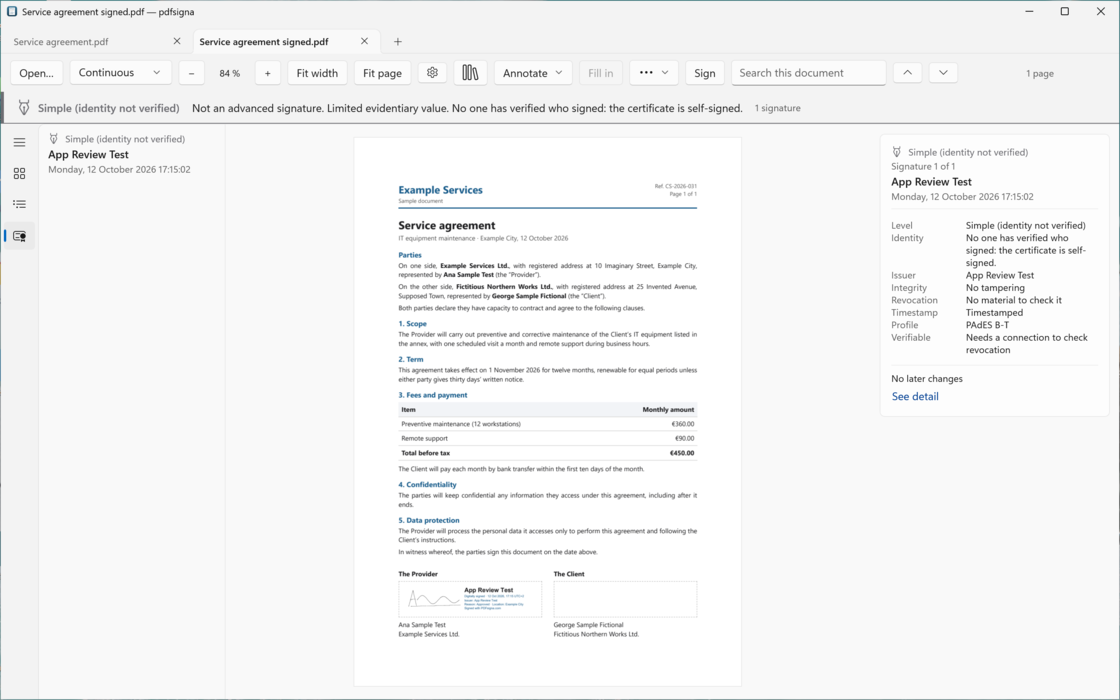
A real screenshot of the Windows app, the one on the Microsoft Store: the same invented agreement, signed with the same self-signed test certificate and a real timestamp. The document is intact and the timestamp is good, but the app won’t raise the level: no one has verified who signed, and it says so. With a certificate from a recognised provider, the same screen reads “Advanced”, or “Advanced with a qualified certificate” when the European trusted list backs it.
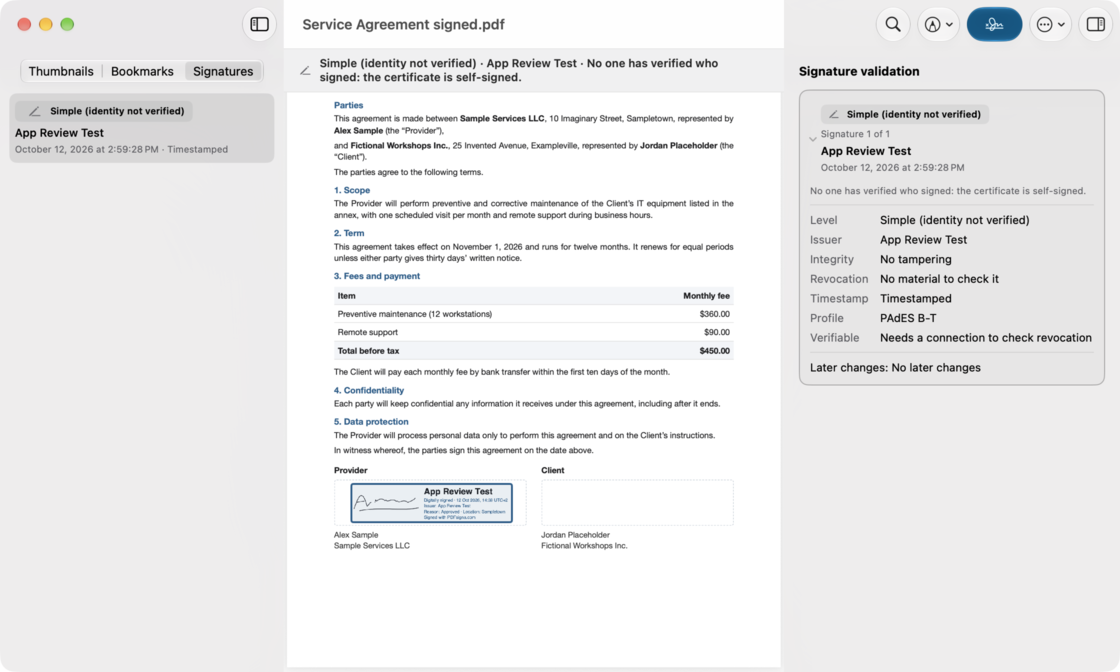
A real screenshot of the Mac app: an invented agreement, signed with a self-signed test certificate and a real timestamp. The document is intact and the timestamp is good, but the app won’t raise the level: no one has verified who signed, and it says so. With a certificate from a recognised provider, the same screen reads “Advanced”.
- The status band: level, signer and, when the level falls short, why. It can’t be collapsed or hidden.
- The signatures in the document, each with its level and the date its timestamp proves.
- The validation card: integrity, revocation, timestamp, PAdES profile and later changes.
- Your certificate never leaves your machine. No servers, no document uploads, no telemetry on your files.
- No sign-up, no email, no “sign in to continue” — in any version, ever.
- Free, with no subscription. If a paid plan ever comes, we intend it to be a one-time purchase, not a monthly bill.
What it looks like
On Windows you can run it today. Here you can see all of it.
Everything on this page is something the app does today, drawn from the code and not from a wishlist. The screenshot at the top can be shown from Windows or from the Mac; the ones below are from the Mac app, and the Windows app does the same things with its own look — there are more of its screenshots on its Microsoft Store page.
With one caveat about levels. “Advanced with a qualified certificate” requires checking the certificate against the European trusted list. The Windows app already does, and can say so; the Mac app doesn’t yet, so on the Mac a certificate from a recognised provider stops at “Advanced”. And one nobody vouches for, like the test certificate in the screenshot above, stays at “Simple (identity not verified)” — with the app telling you why.
-
No certificate: a visual signature, called what it is
Drag on the page where the line is and your handwriting goes there, with handles to move and resize it — from the keyboard too. With no certificate behind it the level is Simple, the panel says so before you save, and the file that comes out says marked, never signed.
Services agreement
PlacingSimple (visual signature) “Not an advanced signature. Limited evidential weight.”Services agreement marked.pdf
Mock-up Drawn in HTML: a visual signature with no certificate behind it, its handles, the Simple level before you save, and the file that comes out, marked. The band and the file name are the app’s own. -
With a certificate: the level before you sign
Your certificate — from the system keychain or certificate store, or a
.p12file — produces a real PAdES signature, and your handwriting becomes the appearance of that signature field. Before you sign, the panel tells you which level you are about to land on.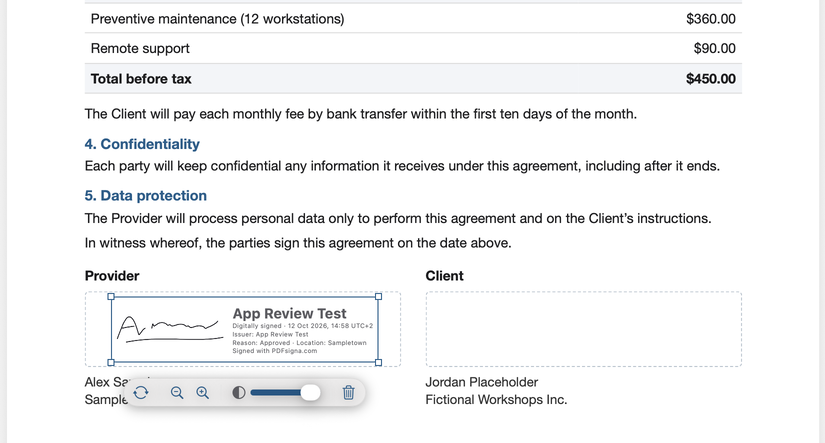
Screenshot · macOS app Signing with a certificate: you draw the box where the signature goes and the handwritten signature sits inside the digital signature, with the certificate details. Handles, a floating bar, and it all works from the keyboard too. The certificate is a self-signed test one, so its level is “Simple (identity not verified)”.
Version 1.0 is out, and here’s what isn’t ready
Version 1.0 is free and does what this page says it does. What it doesn’t do is listed here, by name: we would rather tell you what’s missing than let you find out later.
-
The Mac version is in review. The Windows app has been on the Microsoft Store since 12 October 2026. The Mac app has been submitted to Apple and ships once they approve it; we give no date because it isn’t ours to give.
-
Version 1 doesn’t promise any smart card, the Spanish national ID card included. The Spanish national ID card is not a standard PIV card, it depends on the vendor’s own module, and it has a bad history on Apple Silicon. Standard PIV cards aren’t offered either until they’ve been tested with a real one. The system keychain and
.p12files cover the common case. We’ll announce card support when it genuinely works. -
The online validator isn’t live. It needs the signing core compiled to WebAssembly, and it ships when it produces the same verdict as the desktop app.
-
iPhone, iPad and Android: possible, not scheduled. They’re on the roadmap as an option, with no date and no commitment. If they happen, they’ll be genuinely native on each, or not at all. If a platform can’t be done natively, that platform waits — we are not going to wrap a web view in a title bar and call it an app.
Where to go from here
None of these is a brochure: what the app does, what a signature is actually worth, what the alternatives cost, the validator we haven’t built yet, and help when you need it.
- How it works Every feature the app has today, one at a time, each with a screenshot or a mock-up.
- Legal levels The five levels of an electronic signature, and why a drawing isn’t one of them.
- Comparison What Preview, Acrobat, PDF Expert and DocuSign cost, and where each of them stops.
- Validator The free validator that will run inside your own browser. Not live yet.
- Support Answers about certificates, the legal levels, privacy and plans, and a way to write to us.
Accessibility
A feature we advertise, not a box we tick
No PDF app does this well. In PDFsigna you can place, move and resize a visual signature using only the keyboard or a screen reader; text scales to the system maximum without any panel truncating; every piece of text clears 4.5:1 contrast; and the five levels are validated in light mode, dark mode and increased contrast. Never colour alone — always a symbol and a label.
This page holds itself to the same standard: a skip link, visible focus, a real heading hierarchy, a menu and a language picker that work from the keyboard, and not one line of JavaScript.