On the roadmap · no date
An online signature validator, on our roadmap
Drop in a signed PDF and find out whether the signature holds: who signed it, at which level, whether their certificate was valid at the time, and whether anything changed afterwards. It isn’t live yet, and we can’t say when it will be — this page tells you so rather than collecting your email in the meantime.
Your document never leaves your machine
It will run entirely inside your browser, using the same signing engine as the app compiled to WebAssembly. Your document isn’t uploaded to a server, because there is no server to upload it to.
That is not a privacy posture, it is the architecture. Every other free validator on the web works by taking a copy of your contract. If the file you are checking is a contract, a payslip or a court filing, that copy is the problem.
The intention: free, no usage limit, no account. It isn’t a product — it’s how you find out we exist.
The drop area for your signed PDF will live here.
Not available yet, and no date set. It depends on compiling the signing core to WebAssembly, and it won’t ship before it agrees with the app.
What the answer will actually say
Three outcomes, the same three the European validation standard defines. Not a green tick and a red cross.
-
Valid, with its level
The signature verifies and the document is intact. Which is not the end of the question: a signature can be perfectly valid and still be worth much less than the person relying on it assumes. The five levels are where that gets decided.
-
Invalid, with the reason
Integrity or the certificate chain failed, and you get told which. A verdict with no reason attached is not a verdict, it is a mood.
-
Validity can’t be confirmed
Neither of the other two — the commonest real-world answer, and the one every other tool rounds off to “invalid”. Saying a document was tampered with is an accusation. This outcome gets a treatment of its own and borrows none of the five level colours.
The desktop app already does this
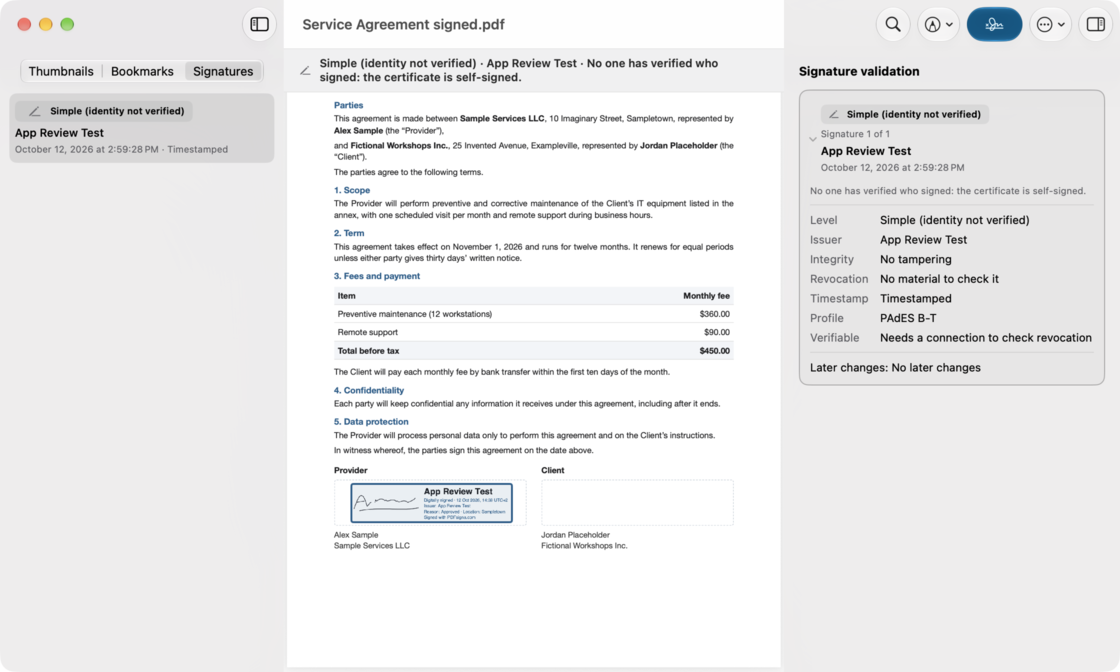
The verdict engine is not the part that’s missing. Open a signed PDF in PDFsigna today and you get all of it: the signer, the level, whether the certificate was valid at signing time, and whether anything changed afterwards. What is missing is the piece that makes it run in a browser without a server.
This is the Mac app doing exactly that, and the rest of what the app does is on how it works.
Why it isn’t live, in plain terms
The signing and validation engine is written once, in Rust, and shared by every platform — that is the only way four native apps can give the same answer about the same file. Making it run in a browser means compiling it to WebAssembly and serving it under the isolation headers that needs.
The bar for publishing it is not “it loads”. It is that it produces the same verdict as the desktop app on the same document. A web validator that disagrees with our own app would be worse than not having one, because people would quote it.
There is no waiting list on this page and no email field, and that is deliberate: this product promises you never have to make an account, and a form on a website is a strange place to start bending that.